
Introduction
Recent articles about Apple in higher education highlight how colleges and universities are using technology to support teaching, creativity, accessibility, collaboration, and student learning. For students in the USA, Apple devices such as Mac and iPad can support many academic activities, from research and note-taking to coding, design, data analysis, and multimedia projects.
Apple’s current higher-education resources emphasize devices, professional learning, accessibility, software compatibility, and practical campus use. Apple also publishes higher-education success stories showing how institutions and students use its technology in real academic settings.
How Apple Technology Supports Student Learning
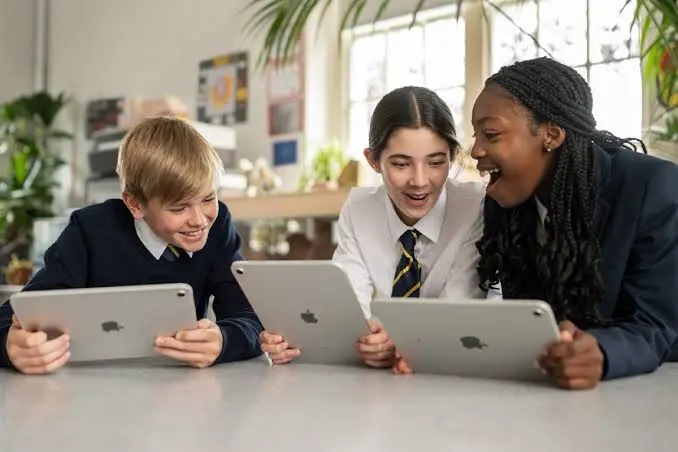
Apple technology can support student learning by giving learners flexible tools for research, communication, creation, and collaboration. The value does not come from the device alone; effective learning depends on how students and instructors use technology within a course.
Mac and iPad can support activities such as:
- Taking and organizing digital notes
- Reading academic documents and research papers
- Creating presentations and visual projects
- Coding and software development
- Analyzing information and data
- Collaborating on group assignments
- Recording and editing multimedia projects
- Using accessibility features for individual learning needs
Apple’s college-student resources currently show examples across fields including computer science, neuroscience, engineering, biology, marketing, business analytics, and natural sciences.
Why Recent Articles About Apple in Higher Education Matter
Recent articles about Apple in higher education are useful because they show how technology is being connected to real educational goals rather than simply focusing on hardware.
For example, current Apple education resources describe higher-education environments where students use Mac and iPad for demanding academic workflows, while faculty can access professional learning resources and instructional materials.
This is important for students because technology can become part of the learning process instead of being used only for basic internet access.
Learning Through Creativity
Creative assignments can help students demonstrate knowledge in different ways. Depending on the subject, a student might create a presentation, video, illustration, prototype, data visualization, or digital portfolio.
This approach can be especially useful in fields such as:
- Design
- Media production
- Business
- Engineering
- Computer science
- Communication
- Arts and humanities
Apple and Accessibility in Higher Education
Accessibility is another important part of student learning. Students may have different physical, visual, auditory, or learning needs, so technology should provide flexible ways to interact with course materials.
Apple highlights accessibility features as part of its college-student education resources. One current Apple student story, for example, describes how accessibility features on Mac can support a university student’s learning experience.
The practical lesson is simple: students should explore the accessibility settings available on their devices and choose features that make reading, writing, navigation, or communication easier.
Practical Examples of Apple in Student Learning
The strongest use of educational technology is connected to a clear academic objective.
Example 1: Computer Science
A computer science student can use a Mac for programming, testing applications, managing projects, and learning development tools. Apple’s current student resources specifically highlight computer science work with Xcode.
Example 2: Business Analytics
Business students can use productivity and spreadsheet applications to organize information, analyze data, prepare reports, and present findings.
Example 3: Design and Creative Courses
Students in visual arts and design can combine Mac and iPad workflows for creating, editing, illustrating, and presenting projects.
Example 4: Engineering
Engineering students may use specialized software for modeling, design, documentation, and technical coursework. Apple currently highlights applications such as SketchUp and other professional tools for academic fields.
Benefits and Limitations
Apple devices can offer useful advantages for higher education, but they are not automatically the best choice for every student or course.
Potential Benefits
- Strong support for creative work
- Portable devices for campus use
- Integration between Apple devices
- Wide range of educational and professional applications
- Built-in accessibility features
- Tools for coding, writing, research, and multimedia work
- Professional learning resources for educators
Apple also provides professional learning resources for faculty, including its Learning Center, community resources, and Apple Learning Coach program.
Possible Limitations
Students should also consider course requirements before choosing a device. Some academic programs may depend on specialized software that has specific operating-system requirements.
Cost can also be an important factor. Students should compare education pricing, institutional support, software requirements, and the expected lifespan of a device before making a purchase.
How Students Can Use Apple Technology More Effectively
A device becomes more useful when students connect it to a consistent study system.
Step 1: Identify Your Academic Needs
Before downloading apps or purchasing accessories, list the activities you perform most often. These might include writing, research, coding, design, presentations, or data analysis.
Step 2: Choose the Right Applications
Use applications that directly support your coursework. Avoid filling your device with unnecessary tools that create distraction.
Step 3: Organize Course Materials
Create a clear folder structure for each course. Keep assignments, lecture notes, research materials, and final submissions organized.
Step 4: Use Accessibility Features
Explore accessibility settings early rather than waiting until a problem affects your study routine.
Step 5: Protect Your Academic Work
Regular backups, strong passwords, software updates, and secure account practices can help reduce the risk of losing important coursework.
Common Mistakes Students Should Avoid
One common mistake is assuming that buying expensive technology automatically improves academic performance. Technology is only a tool. Good study habits, quality instruction, active participation, and consistent practice remain essential.
Another mistake is choosing a device without checking course requirements. Students should review their university’s recommended hardware and software before purchasing.
Students should also avoid excessive multitasking. Having many apps and browser tabs open at once can make studying less focused rather than more productive.
Education AppleYour WebsiteFrequently Asked Questions
What do recent articles about Apple in higher education focus on?
Recent Apple education resources focus on how Mac, iPad, applications, accessibility tools, professional learning, and campus technology can support higher education. Current Apple materials include student examples and institutional success stories that demonstrate practical uses across different academic fields.
Recent articles about Apple in higher education highlight how Apple technology is transforming modern classrooms.
Many Recent articles about Apple in higher education discuss the use of iPads, MacBooks, and educational apps.
Recent articles about Apple in higher education also explore how teachers use Apple devices to improve student engagement.
According to Recent articles about Apple in higher education, digital learning tools can make education more interactive and accessible.
Recent articles about Apple in higher education frequently examine innovation, creativity, and technology-based learning methods.
Overall, Recent articles about Apple in higher education show the growing role of Apple products in modern education.
How can Apple devices help college students learn?
Apple devices can support research, writing, note-taking, coding, creative projects, presentations, collaboration, and data-related coursework. The specific benefit depends on the student’s field of study and the software required by the university. Students should choose technology based on their academic needs rather than the device brand alone.
Is Mac useful for university students?
Mac can be useful for many university students, particularly those studying subjects involving coding, design, writing, research, business, and multimedia work. Apple currently highlights academic applications and workflows across numerous fields. However, students should confirm that the software required for their specific program is compatible before purchasing a Mac.
How does Apple support accessibility in higher education?
Apple includes accessibility features across its devices that can help students interact with technology in different ways. These features may support vision, hearing, mobility, and other individual needs. Apple also publishes student stories demonstrating how accessibility features can contribute to university learning experiences.
Should every college student buy an Apple device?
No. The best device depends on the student’s course requirements, budget, software needs, and preferred workflow. Apple devices can be excellent for many academic tasks, but students should compare requirements and available alternatives before purchasing. Checking university recommendations is a practical first step.
Recent articles about Apple in higher education highlight how Apple technology is transforming modern classrooms.
Many Recent articles about Apple in higher education discuss the use of iPads, MacBooks, and educational apps.
Recent articles about Apple in higher education also explore how teachers use Apple devices to improve student engagement.
According to Recent articles about Apple in higher education, digital learning tools can make education more interactive and accessible.
Recent articles about Apple in higher education frequently examine innovation, creativity, and technology-based learning methods.
Overall, Recent articles about Apple in higher education show the growing role of Apple products in modern education.
Conclusion
Recent articles about Apple in higher education show a growing focus on practical student learning, creativity, accessibility, professional skills, and technology-supported academic workflows. Mac and iPad can help students research, create, collaborate, code, analyze information, and prepare for professional work when they are used with clear learning goals.
For students and educators, the practical next step is to identify the academic tasks that matter most and then choose the tools, applications, and accessibility features that directly support those goals.