
apple vision pro education news is attracting attention from educators, technology leaders, and students interested in new approaches to learning. Apple Vision Pro introduces spatial computing, allowing digital content to appear within a user’s surrounding environment. In education, this technology may support interactive lessons, 3D visualization, virtual experiences, and new forms of student engagement.
This article explores how Apple Vision Pro could fit into student learning, its potential educational benefits, practical classroom applications, limitations, and important considerations for schools in the United States.
What Is Apple Vision Pro?
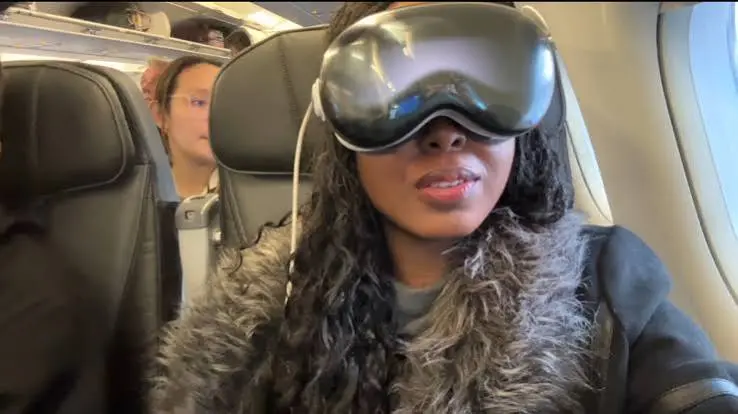
Apple Vision Pro is a spatial computing device that combines digital content with a user’s physical surroundings. Instead of interacting with information only through a traditional computer or tablet screen, users can view apps, images, videos, and other digital experiences within their environment.
For education, this creates opportunities to present complex concepts in more visual and interactive ways.
How Could Spatial Computing Support Learning?
Spatial computing may help students understand subjects that are difficult to visualize through textbooks or standard two-dimensional displays.
Potential applications include:
- Exploring three-dimensional models
- Viewing educational videos in an immersive environment
- Studying anatomy and biological structures
- Exploring historical or geographic environments
- Visualizing scientific concepts
- Practicing simulations in controlled environments
- Supporting project-based learning
The educational value depends heavily on the quality of the lesson and how the technology is integrated into the curriculum.
Apple Vision Pro Education News and Classroom Applications
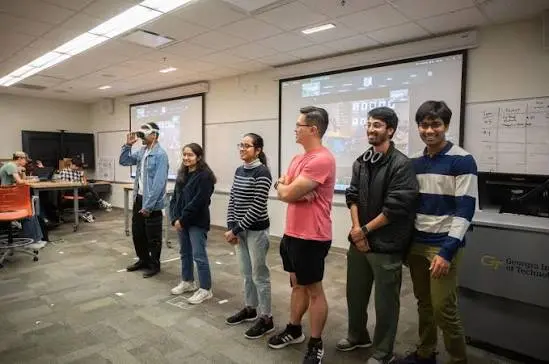
Recent discussion around Apple Vision Pro and education has focused on how spatial computing could create more immersive learning experiences. Rather than treating the headset as a replacement for conventional teaching, educators can consider it as an additional tool for specific learning activities.
Science and STEM Education
STEM subjects can benefit from visual models because students often need to understand structures, systems, and processes that are difficult to observe directly.
For example, a biology lesson could use a three-dimensional model to help students examine parts of the human body. Similarly, students studying astronomy could interact with visual representations of planets and other objects.
History and Geography
Spatial experiences may also make historical and geographic subjects more engaging.
Students could potentially examine digital environments, maps, locations, and reconstructed settings. These experiences can give learners additional context while teachers explain the relevant historical or geographic information.
Art and Design
Creative subjects may benefit from spatial interfaces because students can work with digital objects in a more visually oriented environment.
Students studying design, architecture, or digital art could use spatial experiences to explore concepts such as scale, composition, form, and three-dimensional space.
Benefits of Apple Vision Pro for Student Learning
The strongest potential benefit is visual and immersive learning. Students may understand certain concepts more easily when they can interact with or observe digital information in a spatial environment.
Other potential advantages include:
- More engaging visual experiences
- Opportunities for interactive demonstrations
- Support for complex 3D concepts
- New possibilities for experiential learning
- Flexible access to digital educational content
- Potential support for different learning activities
However, technology should support a clearly defined educational objective rather than being introduced simply because it is new.
Limitations Schools Should Consider
Apple Vision Pro also presents practical challenges for educational institutions. Cost, device management, classroom logistics, accessibility, privacy, and teacher training all need careful consideration.
Schools should evaluate:
- Whether the device provides meaningful educational value.
- Whether suitable educational content is available.
- How students will share or access devices.
- How teachers will manage classroom activities.
- Whether the experience meets accessibility requirements.
- How student privacy and data protection will be handled.
A successful implementation requires more than purchasing hardware.
How Teachers Can Use Spatial Computing Effectively
Teachers considering immersive technology should start with the lesson rather than the device.
A Practical Implementation Approach
Step 1: Identify the learning objective
Determine exactly what students should understand or accomplish.
Step 2: Choose an appropriate experience
Select digital content that directly supports the objective.
Step 3: Prepare students
Explain how the technology will be used and establish classroom expectations.
Step 4: Combine technology with instruction
Use discussion, questions, reading, writing, or group activities alongside the immersive experience.
Step 5: Measure learning
Assess whether students actually gained knowledge or skills from the activity.
This approach helps prevent technology from becoming a distraction.
Common Mistakes to Avoid
One common mistake is assuming that immersive technology automatically improves learning. A visually impressive experience may not produce meaningful educational outcomes without effective instruction.
Another mistake is ignoring accessibility and student comfort. Schools should consider whether every learner can participate effectively and whether alternative learning methods are available.
Teachers should also avoid using spatial technology for activities that can be completed more simply with existing classroom tools.
Apple Vision Pro vs. Traditional Learning Tools
| Learning Approach | Main Strength | Potential Limitation |
|---|---|---|
| Textbooks | Detailed reading and reference | Limited visualization |
| Tablets | Flexible digital learning | Usually screen-based |
| Laptops | Research and productivity | Less immersive |
| Apple Vision Pro | Spatial and immersive experiences | Cost and classroom logistics |
| Hands-on activities | Physical interaction | Resources may be limited |
The best educational strategy may combine several approaches instead of relying on one device.
Schools and students can also explore our guide to Apple Education Discount to understand education-related purchasing options.
For official product specifications, accessibility information, and current features, visit Apple’s Apple Vision Pro page.
Frequently Asked Questions
What is Apple Vision Pro education news about?
Apple Vision Pro education news generally focuses on the possible use of Apple’s spatial computing technology in learning environments. Topics can include immersive lessons, 3D visualization, educational applications, simulations, and classroom experimentation. Schools should evaluate each use case based on educational value, accessibility, cost, privacy, and teacher requirements.
Can Apple Vision Pro improve student learning?
Apple Vision Pro may support learning when immersive or spatial experiences provide something that traditional tools cannot easily offer. For example, three-dimensional visualization can be useful for certain science, design, and technical subjects. However, the device itself does not guarantee better outcomes; effective teaching and appropriate educational content remain essential.
How could students use Apple Vision Pro in education?
Students could potentially use spatial computing for activities involving 3D models, simulations, visual demonstrations, virtual environments, creative projects, and interactive educational content. The exact experience depends on available applications and the school’s instructional goals. Teachers should connect every activity to a specific learning objective.Apple Vision Pro education news is bringing new possibilities to modern classrooms.
Teachers can use Apple Vision Pro education news to explore immersive learning experiences.
Students can benefit from Apple Vision Pro education news through interactive lessons and virtual environments.
Schools are also following Apple Vision Pro education news to understand the future of digital education.
Apple Vision Pro education news highlights how technology can make learning more engaging and practical.
With Apple Vision Pro education news, educators can discover innovative ways to improve student learning.
Is Apple Vision Pro suitable for every classroom?
No. Schools need to consider cost, content availability, device management, student accessibility, teacher training, privacy, and classroom logistics. For some lessons, a laptop, tablet, textbook, or hands-on activity may be more practical. Spatial computing is best considered as one possible educational tool rather than a universal replacement.
What should schools consider before adopting Apple Vision Pro?
Schools should first identify educational objectives and then determine whether spatial computing offers a meaningful advantage. They should also assess hardware costs, software availability, accessibility, privacy, training, maintenance, and classroom procedures. A small pilot program can help educators evaluate the technology before making broader implementation decisions.
Conclusion
Apple Vision Pro education news reflects growing interest in how spatial computing could influence student learning. Its ability to present digital content in an immersive environment may be particularly useful for visualization, STEM, design, simulations, and experiential activities.Apple Vision Pro education news is bringing new possibilities to modern classrooms.
Teachers can use Apple Vision Pro education news to explore immersive learning experiences.
Students can benefit from Apple Vision Pro education news through interactive lessons and virtual environments.
Schools are also following Apple Vision Pro education news to understand the future of digital education.
Apple Vision Pro education news highlights how technology can make learning more engaging and practical.
With Apple Vision Pro education news, educators can discover innovative ways to improve student learning.
For U.S. schools, the practical next step is to focus on educational outcomes first. Teachers and administrators should identify specific lessons where spatial computing could add genuine value, test appropriate experiences, and measure whether students benefit from the approach.